Launching on Product Hunt · Oct 13
Telegram, WhatsApp and Omut. One app.
Your Telegram and WhatsApp chats in one inbox, next to Omut's own messenger. One set of notifications, one account — and long voice messages summarized by Claude.
$3.99 a month
after the beta. Everything included, no “premium” inside
14 days
free. We don't ask for a card up front
3 messengers
Telegram, WhatsApp and our own, in one window
0 lines
of your messages in our logs. Not in debug, not in errors
See it in action
One app for all your chats.
55 seconds: Telegram, WhatsApp and Omut in one window, voice notes, and the beta link.
Install in 30 seconds
Three taps, no sign-up form.
The beta comes through TestFlight, Apple's own app for test builds. One link works on iPhone, iPad and Mac, and new builds arrive on their own.
Mac
macOS 14 Sonoma or later- Get TestFlight for MacFrom the Mac App Store (macOS 12 or later).
- Open the same linkIn a browser on your Mac, then click “View in TestFlight”: beta link
- Accept, then InstallOmut appears in Applications.
Why
Friends are on Telegram, family is on WhatsApp. You keep jumping between apps and still miss things.
Omut puts them side by side. Telegram and WhatsApp open as tabs in one app, next to Omut's own chat. One list of conversations, one set of notifications, one place to look.
- 01Three apps means three sets of badges, sounds and settings.
- 02The message you missed was always in the other app.
- 03Asking everyone to move to one messenger never works. So we brought the messengers together instead.
Three steps
Like the chats you know. Just in one place.
Sign in however suits you: with Telegram, Apple or a password. No SMS. Then connect the messengers you use and write as usual.
Install the app
iPhone, iPad and Mac first. Android and web come next, once iOS is done rather than “almost done”.
Sign in your way
With Telegram, Apple ID or a login and password. Later you can add email and Face ID — several doors, one account. It won't disappear with your SIM.
Write
Telegram, WhatsApp, Omut's own chat. Notifications arrive even when the app is closed.
Inside
One place instead of switching.
The main thing
Telegram, the full client
Not a stripped-down viewer. Multiple accounts, folders, channels, reactions, voice messages, video notes, gifts — everything you're used to. The session lives on our servers, so push notifications reach your locked phone even when the app is closed.
channel · 2 minutes ago
Dinner on Friday at 7?
voice message · 0:12
Our own
Omut chats
Conversations between people who are already here. Regular chats and secret ones with end-to-end encryption, the way you're used to.
Already works
WhatsApp
As a linked device: a code on screen, confirm it in WhatsApp on your phone. Chats, voice messages, photos — right next to Telegram. We tell you about the risk to your number before you enter it, not after.
Already in the builds
Not promises. This works on a phone today.
- Multiple Telegram accountsswitch without logging out
- Folders, pins, searchacross all chats
- Reactions, edits, deletesboth ways
- Voice and video notesrecord and play
- Voice transcriptionto text, right on the phone
- Push with the app closedon the lock screen
- Photos, files, forwardingwith upload progress
- Omut secret chatsend-to-end encryption
- Callsinside Omut, in testing
- iPhone, iPad and Macone account on all of them
- WhatsAppas a linked device
- Sign in your wayTelegram, Apple, password, Face ID
What it looks like
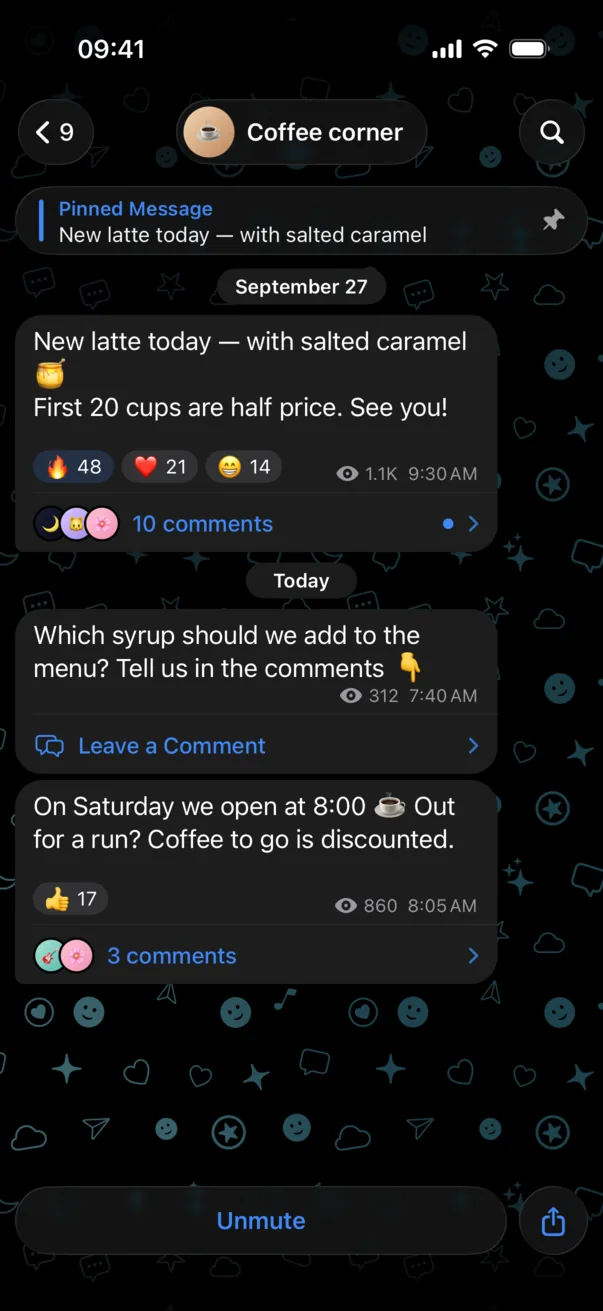
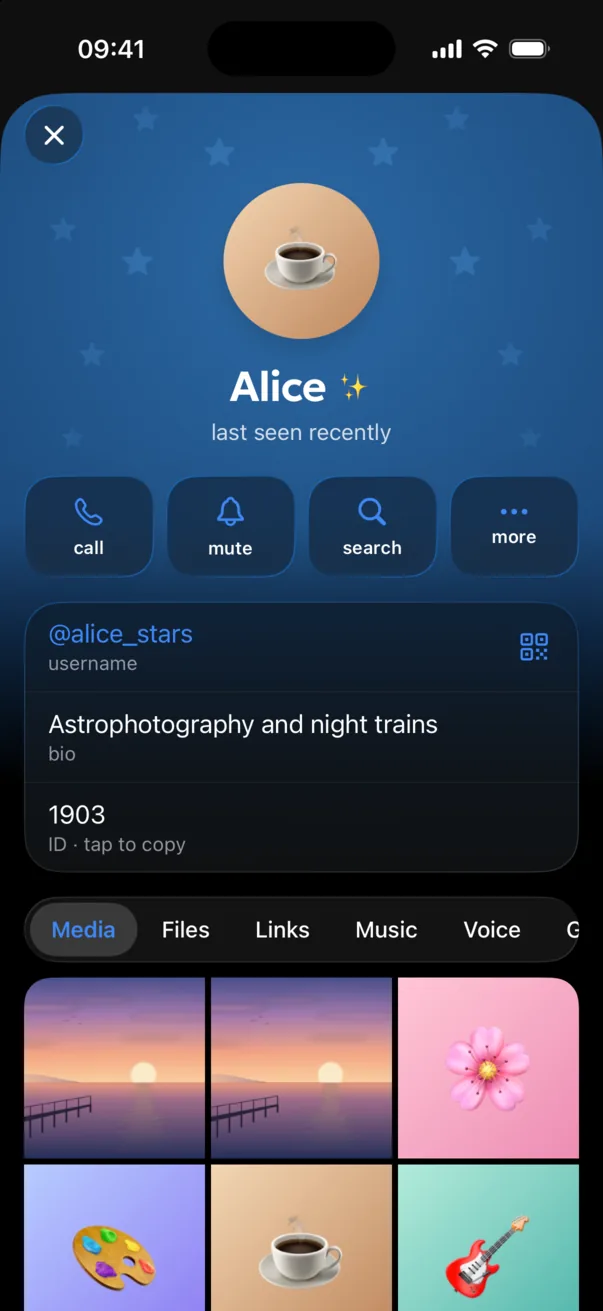
Real screens from the beta.
Not mockups — this is the build you install through TestFlight. Names and messages are made up. The app speaks English and Russian — it follows your phone’s language.




Trust
We could read it. We don't.
For push notifications to work with the app closed, the Telegram session lives on the server, not on the phone. Hiding that would be shameful. So we say it first.
The server sees
- That you're connected, and from which device.
- That a message was delivered. Not its text in the logs.
- Your subscription status, to unlock sending.
The server doesn't
- Write your messages to logs. Not to debug, not to errors.
- Keep media longer than it takes to hand you the file.
- Read your chats. Saying “we can't” would be a lie. “We don't” is the truth.
New In the beta now
AI voice summaries, powered by Claude.
A four-minute voice message becomes a few lines you can read in seconds. Speech is turned into text on your phone, then Claude writes a short summary. The original recording stays one tap away.
- Made for long voice messages you'd rather read than play
- Get the gist in a meeting, a queue or on the train
- The original recording stays in the chat
Translation both ways
Incoming messages arrive in your language. You reply in yours, and it goes out in theirs.
Digests across chats
What happened in busy groups while you were away, in a few lines.
Plans from the conversation
“Let's do Friday at 7” becomes a calendar event in one tap.
No promised dates: features in development appear in a build when they work properly.
Where we're going
One app for the apps you live in.
Every step is a finished product, not a construction site. If a date slips, we'll say so right here.
Open beta
iPhone, iPad and Mac on TestFlight — anyone can install it. We're testing Telegram, our own chat, WhatsApp and calls with real people.
Product Hunt launch
Omut goes on Product Hunt. Still the public beta: free, through TestFlight.
App Store and depth
Release in the App Store, then Omut group chats, stickers, secret chats with a passphrase and calls for everyone.
Android and web
Once iOS is polished, not in parallel “just to have it”. Then the browser at app.omut.chat. Same subscription, same account.
More apps inside
Instagram, YouTube and others in the same window. A small super app, not another icon on the home screen.
Subscription
Free in the beta. Then $3.99 a month.
While the beta runs, everything is free. After the beta: $3.99 a month for everything, paid on the website, with the first 14 days free. After the trial you can still read; sending needs a subscription. We never take your conversations away.
Per month
$3.99 / month
- 14 days free, no card needed up front
- Telegram, WhatsApp, our own chat, notifications
- Multiple accounts at no extra cost
- Reading stays available after the trial
Charged once a month, no in-app extras. Free while the beta runs.
In short
Questions people will ask anyway.
How do I install the beta?
Install TestFlight, Apple's app for beta builds, from the App Store. Then open the beta link on the same device and tap Accept and Install. On a Mac, install TestFlight for Mac and open the same link. Step by step.
Is the beta free?
Yes. Everything is free while the beta runs, with no card required. After the beta Omut costs $3.99 a month, with the first 14 days free.
Is this an official Telegram or WhatsApp app?
No. Omut is an independent app. Telegram connects through its open API, the same way other third-party clients do. WhatsApp connects as a linked device, like WhatsApp on a computer.
Do you read my messages?
Technically, a Telegram session on the server makes it possible. We don't read them and we don't write message text to logs. If we ever find a way to do it differently without losing push notifications, we will.
Can I use several Telegram accounts?
Yes. Several accounts in one app, switch without logging out. One subscription covers everything.
What comes after Telegram and WhatsApp?
More of the apps you check every day: Instagram, YouTube and others, in the same window. A small super app rather than another icon on the home screen. We'll add each one once it works properly, not just to tick a box.
Why isn't it free?
Servers, push notifications, other people's sessions on our machines. A subscription keeps it running. It's not about “monetizing attention”.
Is the app in English?
Yes — the interface is in English and Russian and follows your phone’s language. Your chats in Telegram and WhatsApp stay in whatever language you write them.
Open beta · free
Install it now. It's free.
While the beta runs, everything is free — no card, no subscription. It installs through TestFlight, Apple's official app for test builds. One link for iPhone, iPad and Mac; new builds arrive on their own.

Scan with your iPhone camera, or follow the three steps. Mac: install TestFlight for Mac, then open the same link.
Build news is in the @omut_off channel (in Russian). Found a bug? Take a screenshot and TestFlight will offer to send feedback, or write to [email protected]. Android and web come after iOS, same account.